I have just completed a very exiting Silverlight project hosted in Windows Azure. One challenge I had during the development was setting the start page in the web role project.
During development this of course wasn’t an issue – I just right clicked the page I wanted as startpage as selected “Set as Start Page”.
When I deployed to Azure the start page wasn’t recognized. To set the start page in Azure it is necessary to do one of two things: 1) Implement a start page called “Default.aspx” or 2) specify the start page in the web.config file:
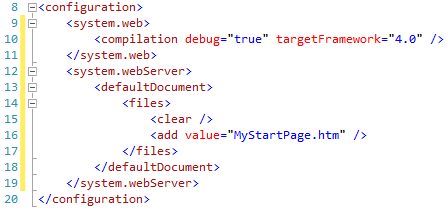
Setting the defaultDocument value in the web.config fixed my issue.
 thomas martinsen