LineStackingStrategy is one of the properties you can set on a TextBlock in Silverlight that enables you to get better control over how text is displayed.
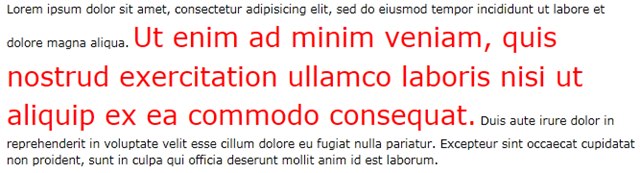
LineStackingStrategy has two valid values: BlockLineHeight and MaxHeight. BlockLineHeight uses the LineHeight defined at the TextBlock even if the elements in the TextBlock actually requires more space. MaxHeight will compensate for this and will use the smallest lineheight required by all elements in the TextBlock.
Lets take a look at an example:
<TextBlock
    TextWrapping="Wrap"
    LineHeight="12"
    LineStackingStrategy="MaxHeight">
        <Run
        FontSize="12">Lorem ipsum dolor sit amet, consectetur adipisicing elit, sed do eiusmod tempor
        incididunt ut labore et dolore magna aliqua.</Run>
        <Run
        FontSize="28"
        Foreground="Red">Ut enim ad minim veniam, quis nostrud exercitation
        ullamco laboris nisi ut aliquip ex ea commodo consequat.</Run>
        <Run
        FontSize="12">Duis aute irure dolor in reprehenderit
        in voluptate velit esse cillum dolore eu fugiat nulla pariatur. Excepteur sint occaecat cupidatat
        non proident, sunt in culpa qui officia deserunt mollit anim id est laborum.</Run>
</TextBlock>
If we use BlockLineHeight:

If we use Maxheight:
by xamlgeek
 thomas martinsen