It’s pretty easy to use localization in Silverlight using resoucefiles (http://msdn.microsoft.com/en-us/library/cc838238(VS.95).aspx and http://msdn.microsoft.com/en-us/library/dd882554(VS.95).aspx). Instead of using resource files it’s possible to use a database and WCF RIA Services to retrieve the localized strings. The following is an example of how to do it.
The server part
First of all I have created an entity to represent my datamodel – the entity is called LocalizatoinItem and have three properties: Key (string), Value(string) and Language (string).

To retrieve the data from the database I have created a repository called LocalizationRepository. The repository retrieves and cache data on the server.

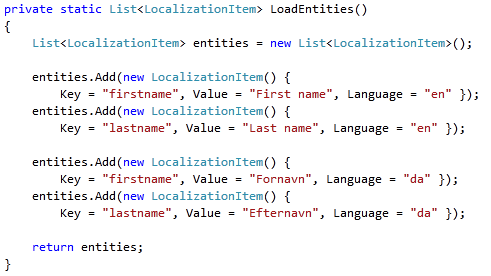
To get data in this example I have created a method to generate the it.
WCF RIA Services make it easy to get data on the client from the server. To enable this, I have created a DomainService called LocalizationService. It contain a method to retrieve an IEnumerable of LocalizatoinItems.

The client part
On the client side I have a class to maintain the state of the application – I have called it ApplicationState. It has a static property called Current that holds an instance of the class and a property called LocalizationStrings that will hold a list of the localized strings.

When the application starts up I call the GetLocalizationItems method on the server to retrieve the localized strings. When the list of strings is retrieved I set the property in the current instance of the ApplicationState and set the RootVisual.

To use the localized strings in XAML I need to use DataBinding and a ValueCOnverter called LocalizationValueConverter. The ValueConverter will retrieve a specific string from the list of localized strings based on the parameter sent to the converter.

In XAML I have made a reference to the LocalizationValueConverter.

To bind the strings to a TextBlock I use DataBinding and sent the key I wish to use as parameter to the LocalizationValueConverter.

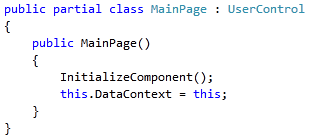
Finally I have set the DataContext on the page to trigger the DataBinding.
It’s properly possible to make some shortcuts compared to the steps above – but it works.
Code is available here.
by xamlgeek
 thomas martinsen